# WOTA Cluster Server
**URL:** https://discourse.wota.xyz/t/wota-cluster-server/626
**Category:** Website
**Created:** [1 February 2026 09:39 UTC](https://discourse.wota.xyz/t/wota-cluster-server/626 "2026-02-01T09:39:43Z")
**Posts on this page:** 2
**Page:** 1
### Author:  [@M5TEA](https://discourse.wota.xyz/u/M5TEA)
#### Post date: [1 February 2026 09:39 UTC](https://discourse.wota.xyz/t/wota-cluster-server/626/1 "2026-02-01T09:39:43Z")
Following a request from Nick [G0HIK](https://www.qrz.com/db/G0HIK) I’ve implemented a WOTA cluster server. You can access this directly via `telnet` but the purpose really is to integrate it into other applications, such as [qlog](https://github.com/foldynl/QLog). It allows applications like [qlog](https://github.com/foldynl/QLog) to receive spots in a standard format. You then can use facilities like automatically changing to the spot frequency on a connected rig.
**Cluster address** : `cluster.wota.org.uk:7300`
It very closely follows the implementation for SOTA, with thanks to Andy GM4LLD from the SOTA MT who implemented their server in python and provided me with some good information. The WOTA server is implemented in the existing [wota-data](https://github.com/urbancamo/wota-data) application and written in Typescript.
The following commands are supported:
### WOTA Cluster Commands:
| Command | Purpose |
| --- | --- |
| sh/dx [n] | Show last n spots (default 25, max 50) |
| sh/users | Show connected users |
| ping1 | Send keepalive every 1 minute |
| ping5 | Send keepalive every 5 minutes |
| ping10 | Send keepalive every 10 minutes |
| ping15 | Send keepalive every 15 minutes |
| bye / quit | Disconnect from cluster |
| help | Show this help message |
Here’s an example of a raw telnet session:
```auto
msw@Marks-MacBook-Pro-2 ~ % telnet cluster.wota.org.uk 7300
Trying 149.22.76.240...
Connected to cluster.wota.org.uk.
Escape character is '^]'.
Welcome to the WOTA Cluster
Set your keepalive pings to no less than 15mins
login: M5TEA
Hello M5TEA, welcome to the WOTA cluster.
Type "help" for available commands.
DX de M5TEA: 3567.0 M5XXX/P WOTA: LDW-001 TEST TEST 2 0925Z
M5TEA de WOTA cluster > help
WOTA Cluster Commands:
----------------------------------------
sh/dx [n] Show last n spots (default 25, max 50)
sh/users Show connected users
ping1 Send keepalive every 1 minute
ping5 Send keepalive every 5 minutes
ping10 Send keepalive every 10 minutes
ping15 Send keepalive every 15 minutes
bye / quit Disconnect from cluster
help Show this help message
Spots are broadcast automatically when they arrive.
M5TEA de WOTA cluster > sh/dx
DX de M5TEA: 3567.0 M5XXX/P WOTA: LDW-001 TEST TEST 2 0925Z
M5TEA de WOTA cluster > sh/users
Connected users (1):
----------------------------------------
M5TEA connected for 0 mins
M5TEA de WOTA cluster > quit
73 de WOTA cluster. Goodbye!
Connection closed by foreign host.
```
There is a standard format for the spots line with fixed width fields that a connecting application can use to interpret the spot and provide facilities such as one-click changing of frequency on a connected rig.
For a WOTA spot, the callsign of the spotter, spot frequency, callsign of the activator, the WOTA reference, spot comment and time of spot are included:
`DX de M5TEA: 3567.0 M5XXX/P WOTA: LDW-001 TEST TEST 2 0925Z`
Let me know if you have any issues using the facility.
Mark.
---
### Author:  [@M5TEA](https://discourse.wota.xyz/u/M5TEA)
#### Post date: [2 February 2026 12:09 UTC](https://discourse.wota.xyz/t/wota-cluster-server/626/2 "2026-02-02T12:09:53Z")
As an example, to configure the logging software [qlog](https://github.com/foldynl/QLog) to use the WOTA Cluster, do the following.
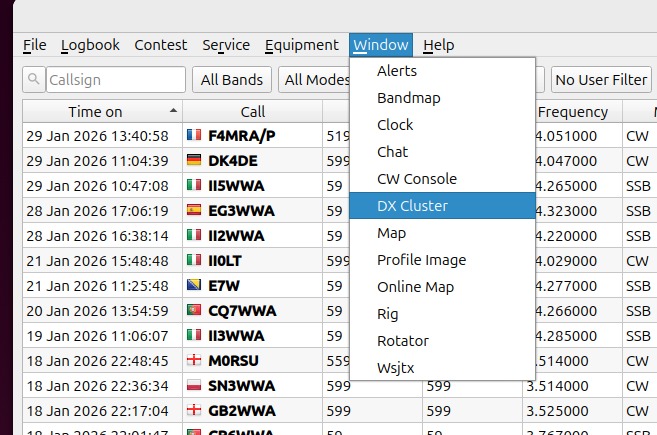
Firstly select the _DX Cluster_ window from the Window menu:
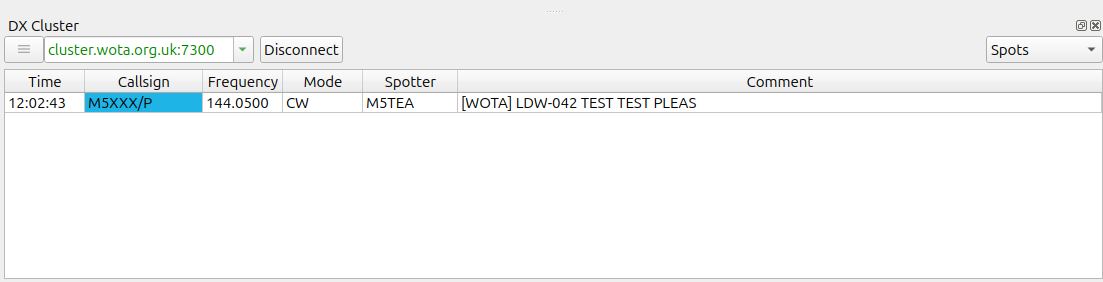
You then see this window.
You can add the address of any cluster server you are interested, here is my list:
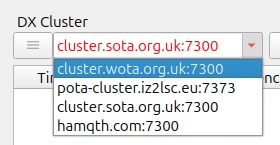
```auto
cluster.wota.org.uk:7300
pota-cluster.iz2lsc.eu:7373
cluster.sota.org.uk:7300
hamqth.com:7300
```
When you click the connect button [qlog](https://github.com/foldynl/QLog) will connect to all listed servers and query for current spots. It will the automatically show new spots for the selected cluster server as they come in:
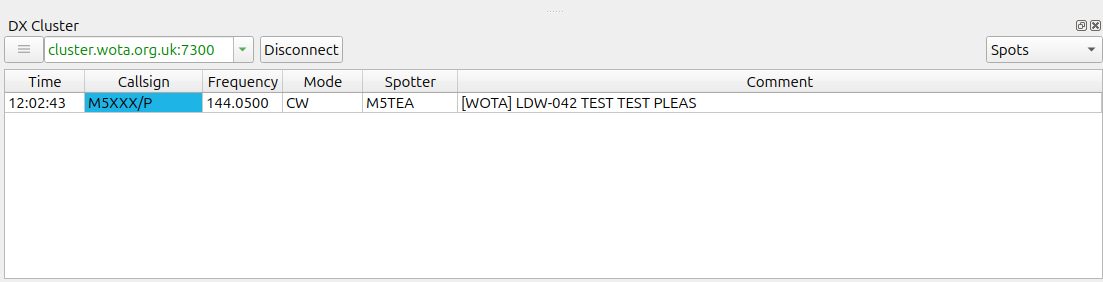
There is a drop-down menu on the top-right of the window (normally set to **Spots** ), if you select **Console** you can see what is being sent to [qlog](https://github.com/foldynl/QLog) ‘raw’:
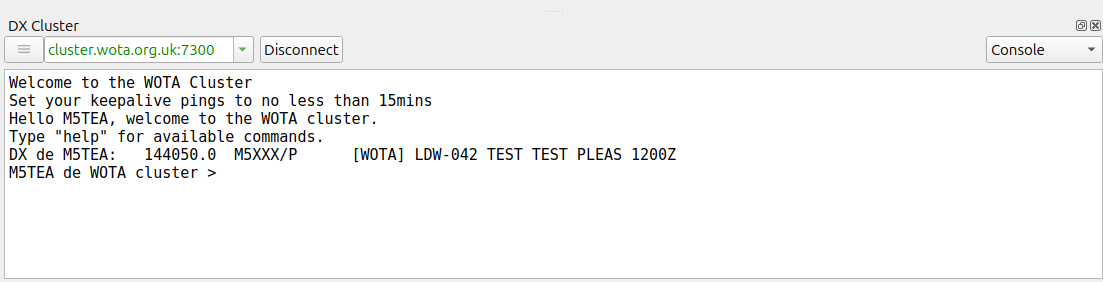
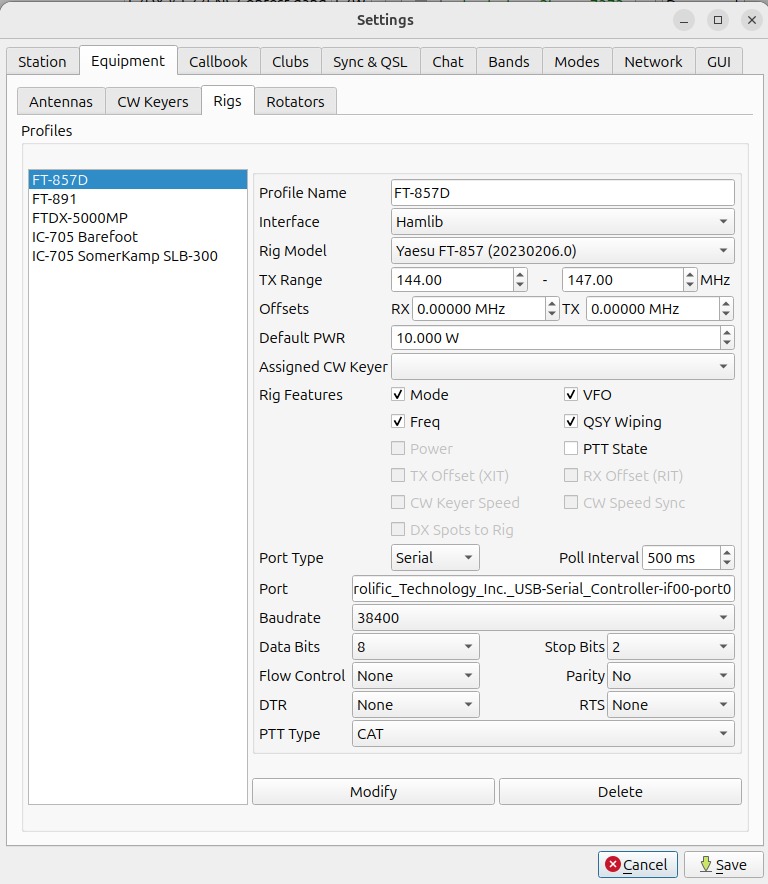
If you have a rig connected then you can double click on a spot and - if the frequency is in the rig’s configured range - then [qlog](https://github.com/foldynl/QLog) will automatically retune your rig to the correct frequency. Here is my configuration for an FT-857D: